ChanGPT

Use โ€œ@โ€ to ask within context

@Context

5 Credits left

From Complexity to Clarity : Enhancing Citi Connectโ€™s B2B Payment Dashboard for Faster Financial Insights

TL;DR:

Citi Connect is a B2B platform used by treasury managers to oversee transactions, process batch payments and reconcile transactions across global accounts & vendors

Whatโ€™s the problem?

Most of the B2B solution are legacy platforms with less emphasis less on the user expereince. A customer audit found that the Billing and Payment portal had low customer satisfaction scores, caused by disjointed data, no visual summaries, and filters that reset every time.

Whats our solution

The redesign gave treasury managers at a glance transaction summaries, saved custom filter views, and direct payment CTAs, cutting the time spent hunting for information before a payment could even be actioned.

My Contribution

Discovery with SMEs and PMs

Ran a Heuristic Analysis identifying core usability issues and synthesizing findings to frame the redesignโ€™s problem statement.

Applied Jobs-to-be-done framework

to map treasury manager workflows, then ran a feature prioritization matrix to narrow 10 concepts to 4 must-have features

Designed & Shipped 3 user flows

After validating design choices with design critique sessions with actual users, shipped 3 flows with dev hand-off documentation

Led the 4-week design sprint for Citi Connectโ€™s B2B billing and payments dashboard

The Problem

Finding and reconciling payment records is Slow, cluttered, and overly manual for treasury managers

Treasury managers struggled to find relevant payment records due to Outdated UI paradigms and excessive data cluttering the screen, delaying reconciliation of financial reports.

Yes, This is what they had to work with!

The Solution

The system interprets data, & summarizes essential information for informed decision-making.

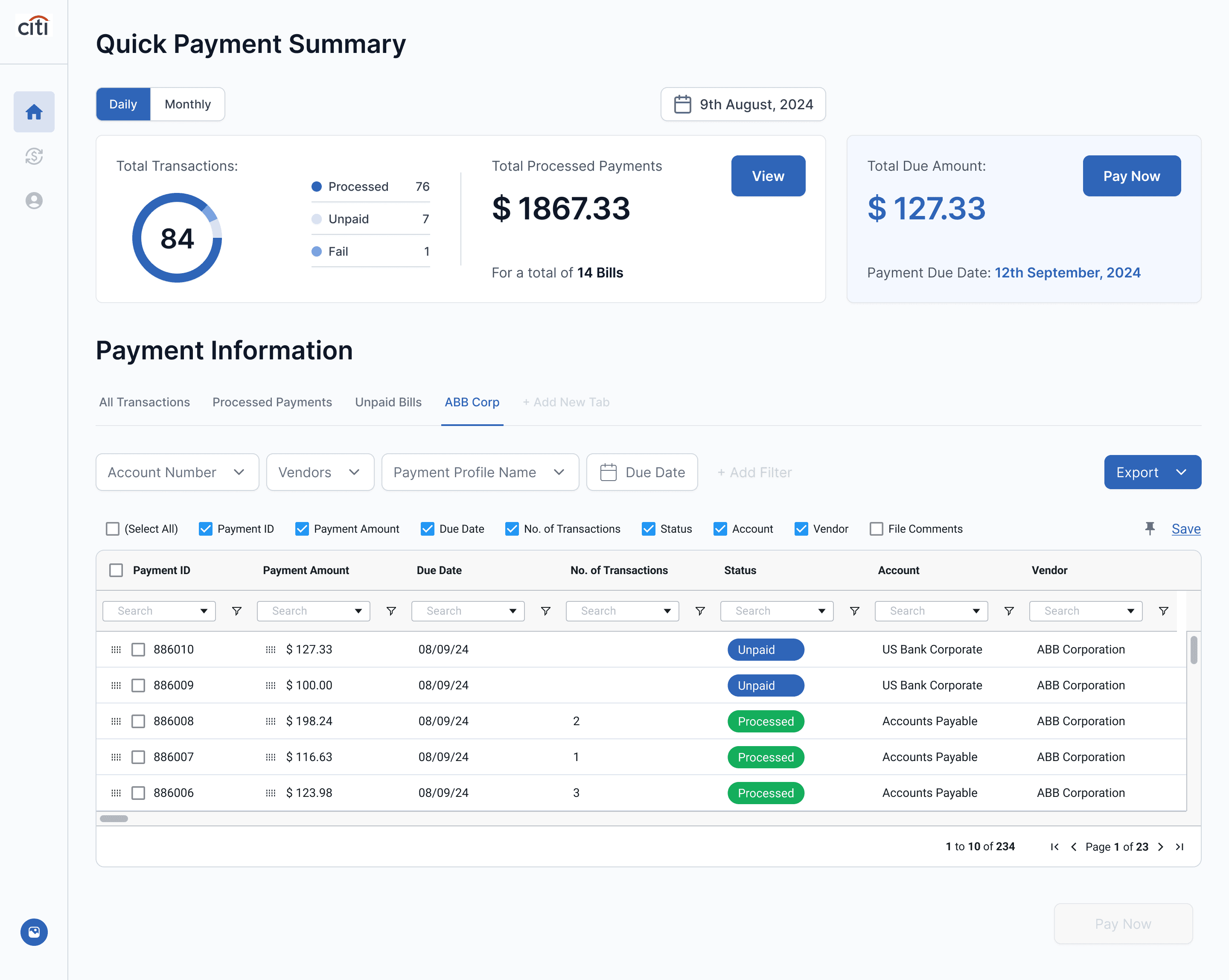
Treasury managers can now build custom pages for every vendor, location, or account combination, refine them with column-level filters pages, and create reconciliation-ready reports directly quick export options

Chrome

File

Edit

View

History

Bookmarks

Profiles

Tab

Window

Help

Mon Jun 22

9:41 AM

Citi Connect - Home

Home โ€“ Confluence

connect.citi.net/home

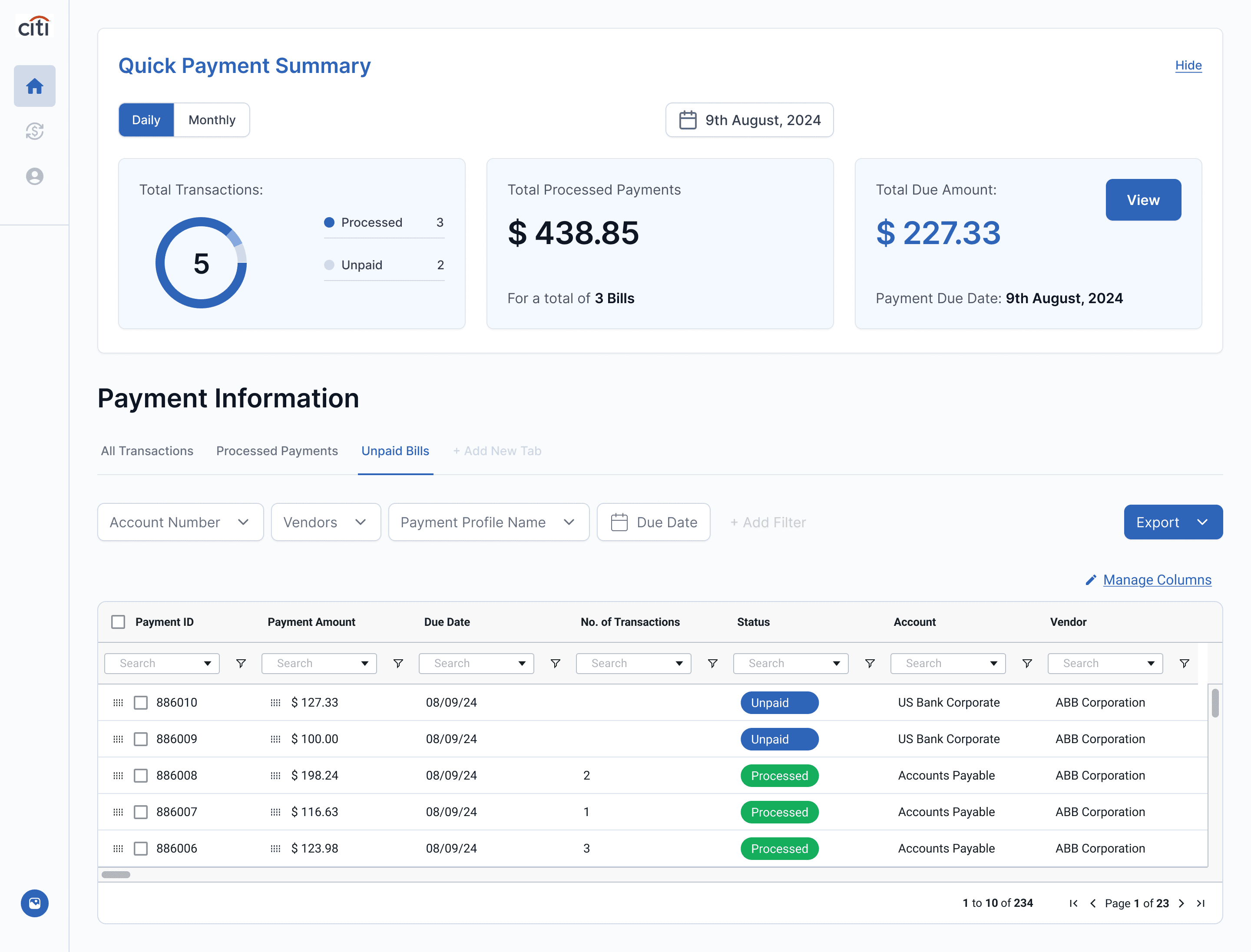
Hide

Daily

Monthly

9th August, 2024

Processed

3

Unpaid

2

Quick Payment Summary

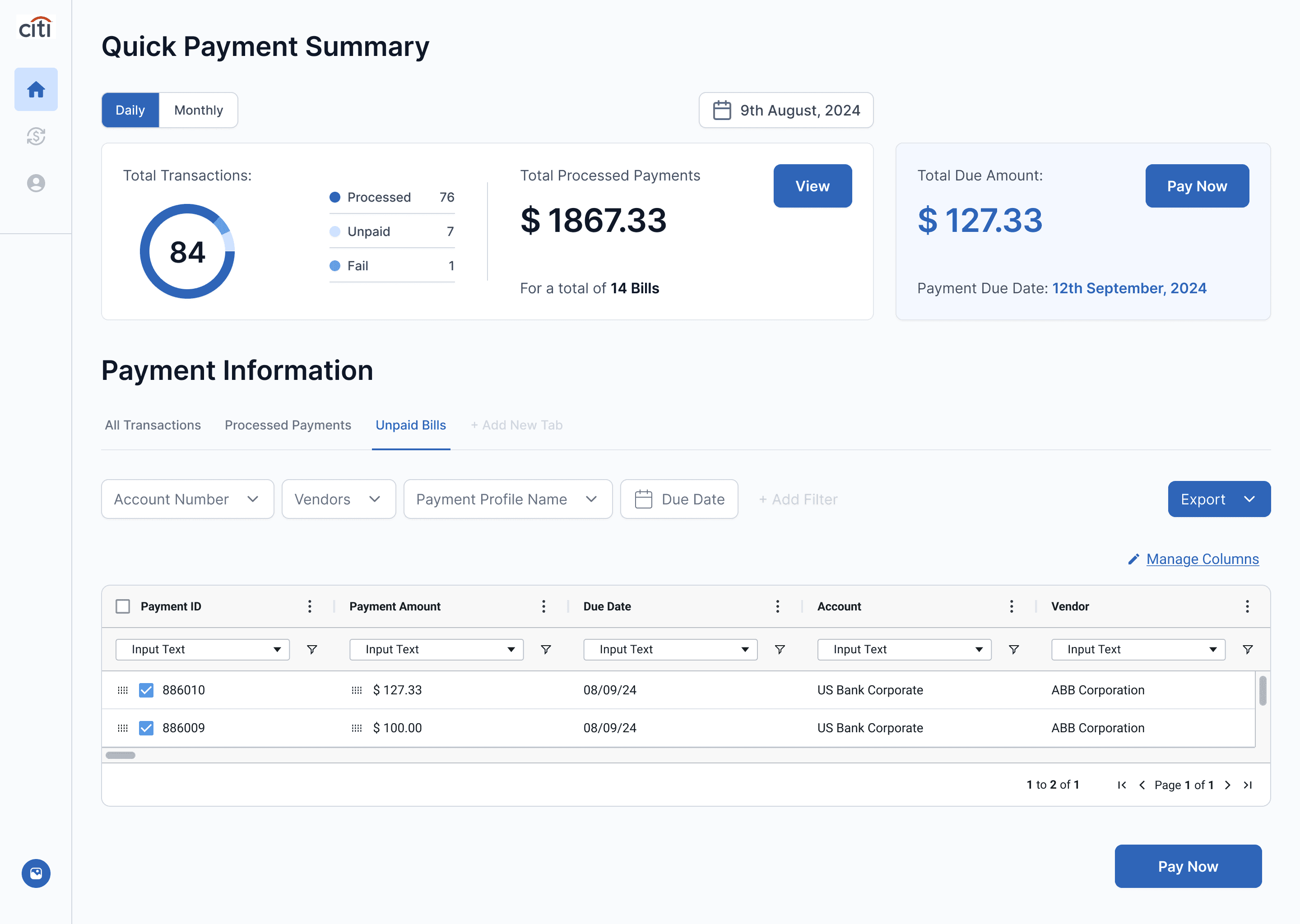
Rolls total transactions, processed payments, and amount due into one widget, with a daily or monthly toggle to view any period and direct Pay Now and View CTAs surfaced right alongside the numbers.

How this solves the problem

Managers get the information right when they need it, instead of manually piecing it together from a full table.

Create Custom Views

Treasury managers can save a default view for frequently visited pages, or create a custom view scoped to a vendor or account, each with its own column-level filters.

How this solves the problem

Managers pick up right where they left off, instead of rebuilding the same view from scratch every time.

All Transactions

Processed Payments

Unpaid Bills

+ Add New Tab

Due Date

Payment ID

Payment Amount

Due Date

Account

Vendor

886010

$ 127.33

08/09/24

US Bank Corporate

ABB Corporation

886009

$ 100.00

08/09/24

US Bank Corporate

ABB Corporation

Due Date

Manage Columns

Payment ID

Payment Amount

Due Date

Account

Vendor

886010

$ 127.33

08/09/24

US Bank Corporate

ABB Corporation

886009

$ 100.00

08/09/24

US Bank Corporate

ABB Corporation

Due Date

Manage Columns

Payment ID

Payment Amount

Due Date

Account

Vendor

886010

$ 127.33

08/09/24

US Bank Corporate

ABB Corporation

886009

$ 100.00

08/09/24

US Bank Corporate

ABB Corporation

Create Flexible Exports

Reports are generated directly from whatever columns are currently shown, trimmed or expanded to fit the task, and filters can be pinned so they persist when a manager moves from a transaction to the payment page.

How this solves the problem

Eliminates the need for Excel or other external tools to filter, sort, and clean up the data before itโ€™s reconciliation ready.

Impact

The redesigned Citi B2B Payments Dashboard was successfully launched after an intensive 4-week design sprint

0X

Faster reconciliation

of financial reports

0%

Reduction in repetitive tasks

filtering different vendors

0%

Increase in user satisfaction

Post-launch metrics

Business Goal

Citi-Connect wanted to reimagine its B2B billing and payments platform, giving treasury managers a way to find relevant transaction data, reconcile reports faster across a combination vendors, locations, and accounts.

Citi-Connect wanted to reimagine its B2B billing and payments platform, giving treasury managers a way to find relevant transaction data, reconcile reports faster across a combination vendors, locations, and accounts.

My Personal Challenge

Treasury managers were not available for discovery until week 3 of the 4-week sprint, leaving only 1 week for validating research, testing, and iteration before delivery.

My Workaround

Grounded early design decisions in second-hand insights, prior product discovery documents, and the Product manager then validated emerging concepts with SMEs once we got access to the users.

Design Strategy

Week 1

Week 2

Week 3

Week 4

Iteration and Hand-off

Second-hand discovery with PMs and SMEs

Validating discovery & Usability testing with actual users

Design exploration, Prototyping

Week 1

Week 2

Week 3

Week 4

Iteration and Hand-off

Second-hand discovery with PMs and SMEs

Validating discovery & Usability testing with actual users

Design exploration, Prototyping

Discovery

Outdated UI, Limited data visualization, lack of customization
are the general themes are the general themes

Outdated UI, Limited data visualization, lack of customization
are the general themes are the general themes

Identified 3 user flows tied to treasury managers that could drive satisfaction rate

KPI Identified - Transaction Reconciliation Rate

Surfaced which actions needed permanent space on the dashboard and which could stay tucked in a menu

8 Jobs-to-be-done outlined

Clustered into 3 core issues: Outdated UI, Limited data visualization, lack of customization are the general themes

12 Heuristics failed

Design Considerations

Custom pages need to support views based on combination of vendors, accounts etc. Not just an all-transactions view.

Scope changes, but the page shouldnโ€™t reset

Exports need column-level control, so the same report can be tailored for different usecases

Reconciliation need different exports, but from the same data

Filters need to persist across pages and should be able to โ€œpinnedโ€, so a treasury managerโ€™s view of the data persists

The task changes, but the filter shouldnโ€™t reset

Based on the synthesis and design requirements, We Identified multiple Jobs-to-be-done by the user, Using which we ideated probable solutions and narrow down the solutions based on feature prioritization matrix

An example of Job-To-Be-Done

Actor

As a Treasury Manager.

Situation

when I need to track overdue payments across global accounts,

Motivation

I need to quickly access Billing data to get actionable insights

Outcome

So I can prioritize tasks, make informed decisions, and ensure smooth cash flow.

Job-To-Be-Done Framework

Feature Prioritization Matrix

Nice to have!

Must have!

Parked for now

Can come later

Data
Color Coding

Alerts &
Notifications

Status Tags
with Tooltips

Inline Actions

Payment
Trends

Visualization

Charts

Universal
Search

Auto Alerts &
Notifications

AI Summary
Generator

Exportable
Reports

Custom
Pages

Data
Widgets

Direct CTAs
for actions

High Impact

High Effort

Low Impact

Low Effort

Feature Prioritization Matrix

Nice to have!

Must have!

Parked for now

Can come later

Data
Color Coding

Alerts &
Notifications

Status Tags
with Tooltips

Inline Actions

Payment
Trends

Visualization

Charts

Universal
Search

Auto Alerts &
Notifications

AI Summary
Generator

Exportable
Reports

Custom
Pages

Data
Widgets

Direct CTAs
for actions

High Impact

High Effort

Low Impact

Low Effort

Since the turn around time of the project was only 4 weeks, our โ€œMust haveโ€ were the one that require low effort but yields High Impact

Chosen Ideas

โ€ข Visualization charts and Data
Widgets

  • Visualization charts and Data
    Widgets

  • Exportable Custom data

  • Direct CTAs for actions

  • Custom Pages

โ€ข Exportable Custom data

โ€ข Direct CTAs for actions

โ€ข Custom Pages

Pain-point 1

Users spent more time hunting for information
than taking informed action

Users faced an overwhelming amount of unstructured data with no guidance on where to start or what to focus on

  1. Lack of Clarity

What does empty status mean?

Does it mean this transaction is unpaid?

  1. Unclear Jargon

Does released means processed/Pending? etc?

1. Cluttered Data Layout

What Information should the user focus?


An overwhelming number of columns.

1. Cluttered Data Layout

What Information should the user focus?


An overwhelming number of columns.

  1. Tedious Filters

The user has to manually search the filter every time for every vendor or for accounts

Solution 1

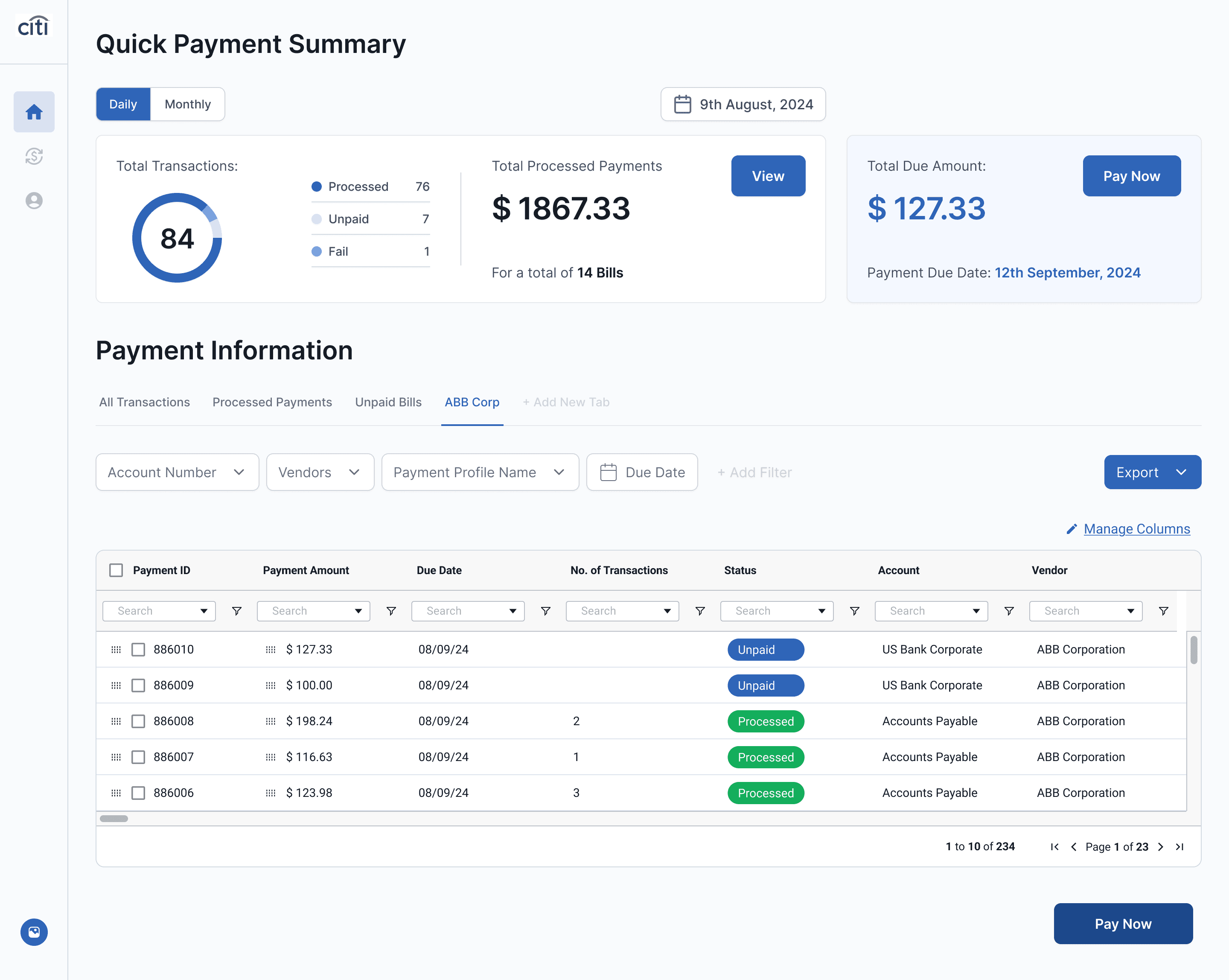
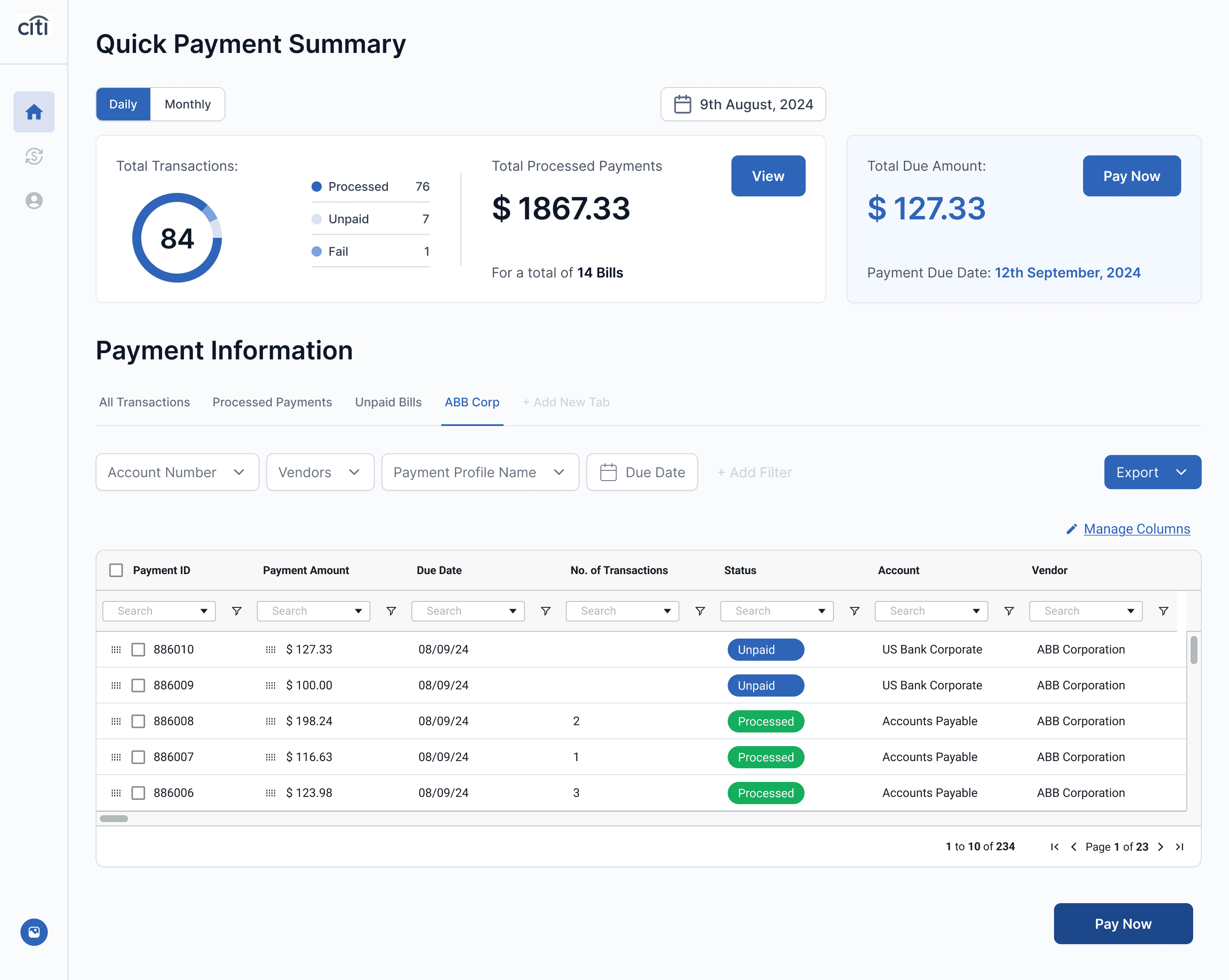
Total transactions & payments processed at a glance

Information summarized at the top along with call-to-actions.
So the users donโ€™t have to piece information together themselves

2. Data over any period at glance

Flexibility to view the desired data over a period of time

3. Direct CTAs

Actionable Insights to the user right at the top of the dashboard

1. Quick-access widgets

At-a-glance financial overview with key metrics surfaced upfront

Pain-point 2

The current filters are rigid & monotonous

The user has to set the filters from the beginning every time
to filter specific data, making the task repetitive and inefficient.

1. Tedious Filters

The user has to manually search the filter every time for every vendor or for accounts

3. Reliance on external tools

Users must utilize tools like Excel to arrange the data and compile reconciliation reports

2. Lack of Sort & Filter Options

Column level customization is not available

Design Exploration

How might we create custom views and column-level filters that let treasury managers see only whatโ€™s relevant to their task?

Design 1

A typical dropdown with checkbox

Familiar pattern, easy to use

Column selection is hidden inside a menu, making customization slower

Dropdowns can feel restrictive for large data

Design 2

Create custom views and a Column sidebar to find only columns that are relevant

Familiar pattern, easy to use

Quick access to filters

Reduces table space

Design 3

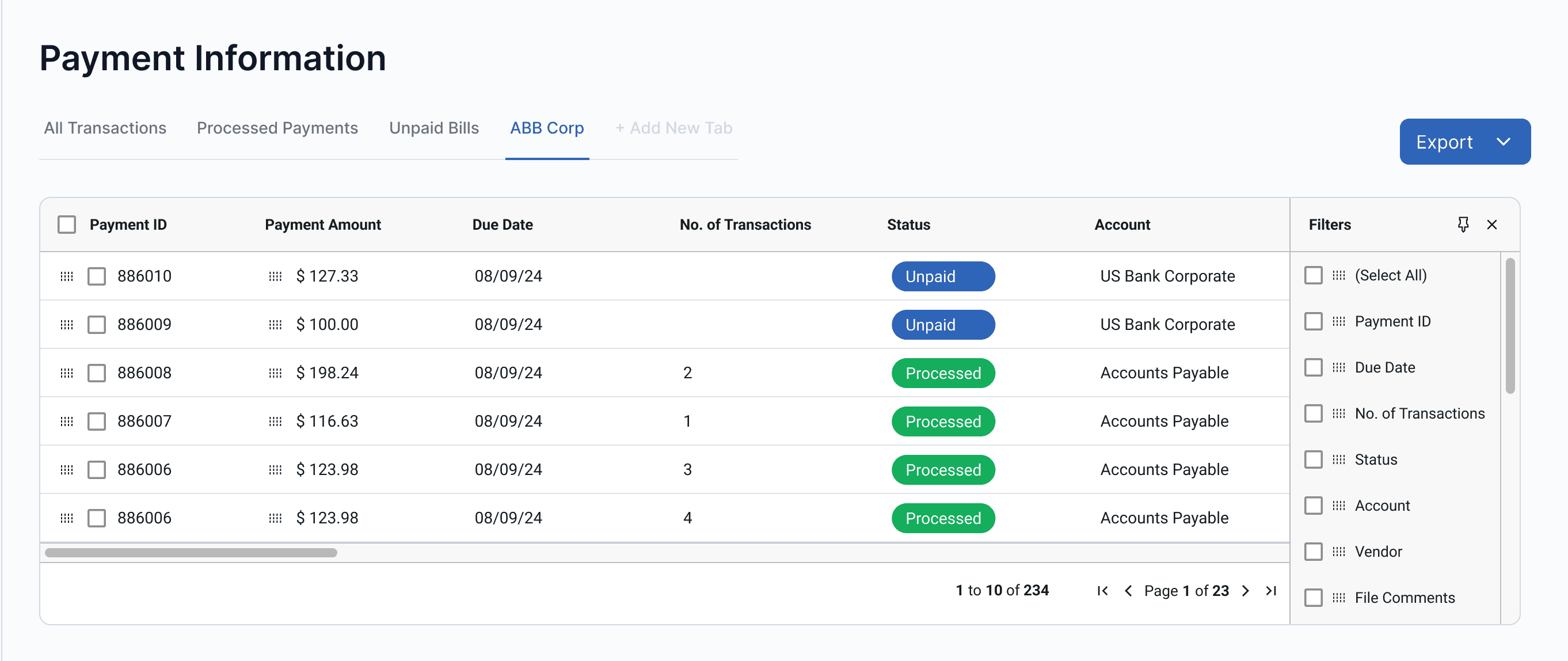
Create custom views, Column Filters Fixed on top with a pin option

Familiar pattern, easy to use

Quick access to filters

Doesnโ€™t take much space

Solution 2

Custom pages, built for every use case

Treasury managers can set-up custom views based on how they actually work,
so that they can bucket large chunks of data into small consumable information

  1. Custom views for vendors

The user can now create custom pages of vendors for quicker access

  1. Default views

Frequently visited pages are now highlighted for easier access

A column filter section that enables the user to customize the columns on the fly without being obstructive

  1. Column level search and filters

Enabling hyper-personalization to the users

  1. Quick Export
    Options

One step to generate customized reconciliation reports

  1. Ability to Pin

Can pin the column filters to change filters on the fly

  1. High-level filters

Frequently used filters to distinguish the data into various categories

Discovery validation & User testing

Finally we have access to the users! ๐ŸŽ‰

Unconventional but frugal

Since we didnโ€™t have access until week 3 of an 4-week design sprint, we had to improvise, test, and iterate within a week!

Discovery & testing with 5 users

Started off with unbiased open-ended interviews, followed by Think aloud assessment to test our designs

Our assumptions were on point, but

All participants agreed that โ€œQuick Payment Summaryโ€ section was useful, but not necessary

The feedback we recieved!

Itโ€™s fine, We all make mistakes! But did you also had to chug coffee to fix it?

Users need the summary but not all the time.

All 5/5 participants agreed that it was inefficient use of screen space.

Inefficient placement of the button

The button gets lost when the user is viewing large pages of data

Feedback & Iterations

Design Iterations that users loved!

Unconventional but frugal

Since we didnโ€™t have access until week 3 of an 4-week design sprint, we had to improvise, test, and iterate within a week!

Discovery & testing with 5 users

Started off with unbiased open-ended interviews, followed by Think aloud assessment to test our designs

Our assumptions were on point, but

All participants agreed that โ€œQuick Payment Summaryโ€ section was useful, but not necessary

Transformed the Quick Payment Summary into a collapsible card. This change preserved its utility but allowed users to toggle its visibility, creating a cleaner, more efficient layout without compromising access.

Re-Arranging the Pay Now button

Increasing the visibility of the button

Collapsible Card for Better Flexibility

allowing users to access it when needed while keeping the dashboard uncluttered.

Final shipped design ๐Ÿš€

Impact

The redesigned Citi B2B Payments Dashboard was successfully launched after an intensive 4-week design sprint

0X

Faster reconciliation

of financial reports

0%

Reduction in repetitive tasks

filtering different vendors

0%

Increase in user satisfaction

Post-launch metrics